

Need help?
Having trouble? Review our FAQ, and if you still can’t find what you are looking for:
Frequently Asked Questions – Certificates
How can I get a certificate for a course I completed?
If you already purchased a certificate before completing the course, you can download it from the course’s main page or your account page.
Otherwise, you have to purchase a certificate for the course. Once you complete a course, you will have an option to buy a certificate. Just go to the course page, and press the “Purchase Certificate” button next to the “You’ve earned a certificate!” message.
I bought a certificate but can’t find it.
First, make sure you’ve completed the entire course. Your progress bar on the course page should be 100%. Make sure that all lessons and modules are marked as complete (be sure to click the “Mark Complete” at the end of each lesson and module).
Once all the lessons under “Course Content” at the bottom of the course homepage have a small blue checkmark, then the “Download Certificate and “Purchase Certificate” options will be available to purchase from the top of the homepage of the course.
You can also find the certificate on your “My Account” page.
Why do I need to purchase a certificate?
First of all, you don’t need to purchase a certificate. Anyone has full access to the course’s materials without cost. You are welcome to complete the course for free.
If you want to earn a certificate upon completion, you will need to pay it. Then, you can share and showcase your new skills. We try to keep the certificate price as low as possible.
Is there financial aid available for certificates?
Our courses are free and we maintain them as such to keep knowledge open. Certificates are administrative we thus charge a small fee. While there is not a formal process for financial aid for the certificates, stay tuned to the EIT Urban Mobility newsletter (you can subscribe at course checkout) because there will be promotions for discounted or free certificates at specific times during the year.
How do I share my certificate on Linkedin?
We are working on an easily shareable certificate for you to share your accomplishment on Linkedin. In the meantime, you can do so by following the following steps:
- Go to “My Acccount” and click on the certificate that you purchased (remember that you must have finished the course and passed the test to access the certificate).

- A new page with your certificate will open.
- Right-click or click on the “Save” button to download your certificate to your computer.

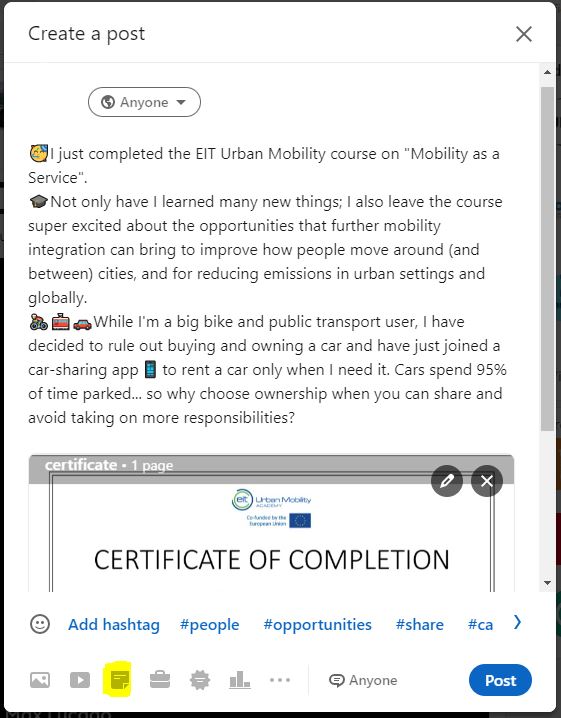
- Go to your Linkedin feed and create a post, where you will be able to upload the certificate (click on the highlighted icon to upload a document to your post). Don’t forget to tag EIT Urban Mobility so we can congratulate you!